<%- include('../partials/Script'); %>
<body>
  <%- include('../partials/NavBar'); %>
  <!-- ======= Solution Section ======= -->
  <section id="solution">
    <div class="container hero-content">
        <div class="hero-text" data-aos="fade-right">
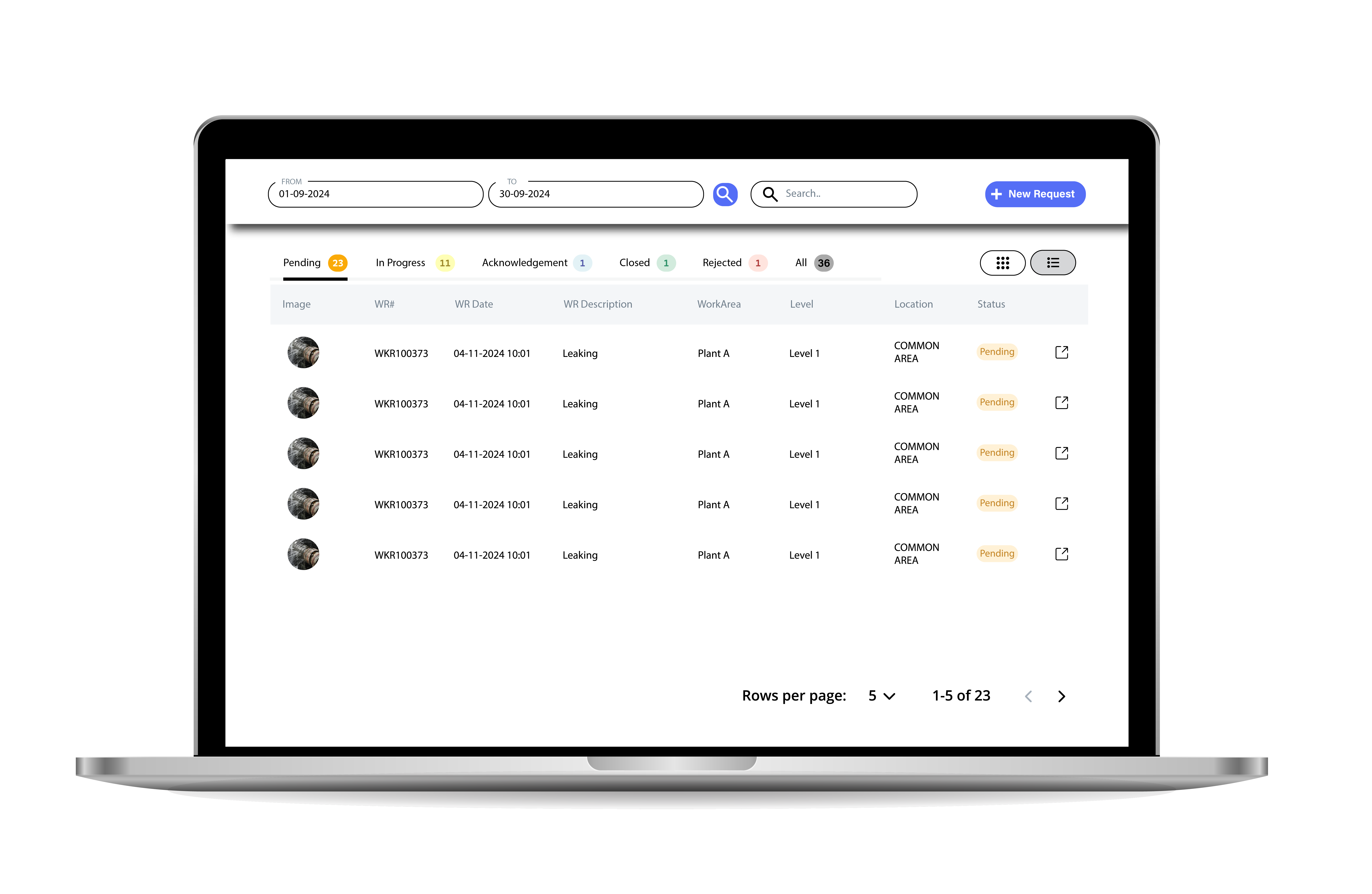
          <h3>CMMS WEBWORK</h3>
          <h1>Request and Monitor Maintenance Jobs.</h1>
          <p>Evantage CMMS allows requestors to easily submit maintenance job requests, ensuring that nothing falls through the cracks.</p>
          <a class="btnlearnmore" href="#wraph">Learn More</a>
        </div>
        <div class="bgimg" data-aos="fade-left">
            <img src="/views/assets/img/ProductPage/CMMSWebwork.png" alt="Work Order Image">
        </div>
    </div>

    <%- include('../partials/Counter'); %>
  </section>
  <!-- ======= End Section Solution ======= -->
  
  <%- include('../partials/Clients'); %>


  <!-- ======= Benefit Section ======= -->
  <section id="benefit">
    <div class="container">
        <div class="row">
            <div class="col-md-6 left" data-aos="fade-right">
                <img src="/views/assets/img/ProductPage/CMMSWebwork.png">
            </div>
            <div class="col-md-6 right" data-aos="fade-left">
                <h1 class="benefit-title">Request & Monitor Maintenance Job</h1>

                <div class="row" class="service-list">
                    <div class="col-2 icon">
                      <i class="material-symbols-outlined">task_alt</i>
                    </div>
                    <div class="col">
                        <h4>Job Request Management</h4>
                        <p>Users can easily submit maintenance job requests, minimizing the risk of oversight and ensuring all tasks are documented.</p>
                    </div>
                </div>
                <div class="row" class="service-list">
                  <div class="col-2 icon">
                    <i class="material-symbols-outlined">task_alt</i>
                  </div>
                    <div class="col">
                        <h4>Status Monitoring</h4>
                        <p>Real-time updates on the status of requests allow users to track their jobs through various stages, from assignment to completion.</p>
                    </div>
                </div>
                <div class="row" class="service-list">
                  <div class="col-2 icon">
                    <i class="material-symbols-outlined">task_alt</i>
                  </div>
                    <div class="col">
                        <h4>Visibility and Accountability</h4>
                        <p>The platform promotes transparency in the maintenance process, enhancing accountability among team members by clearly showing who is responsible for each task.</p>
                    </div>
                </div>
                <div class="row" class="service-list">
                  <div class="col-2 icon">
                    <i class="material-symbols-outlined">task_alt</i>
                  </div>
                  <div class="col">
                      <h4>User Empowerment</h4>
                      <p>The intuitive design encourages engagement from all employees, making it easier for everyone to contribute to maintenance management.</p>
                  </div>
              </div>
            </div>
        </div>
    </div>
  </section>
  <!-- End benefit Section -->

  <!-- Services-->
  <section id="productfeature">
    <div class="container" data-aos="fade-down">
      <div class="feature-title">
        <h1>Evantage CMMS Web Work Feature</h1>
      </div>

      <div class="row">
        <div class="col">
          <div class="border">
            <i class="material-symbols-outlined">add_task</i>
            <h3>Improved Efficiency</h3>
            <p>By streamlining the job request process, WebWork reduces the time it takes to initiate and manage maintenance tasks, leading to quicker resolution times.</p>
          </div>
        </div>
        <div class="col"> 
          <div class="border">
            <i class="material-symbols-outlined">forum</i>
            <h3>Enhanced Communication</h3>
            <p>The real-time status updates and visibility ensure that all stakeholders are informed, fostering better communication within the team.</p>
          </div>  
        </div>
        <div class="col">
          <div class="border">
            <i class="material-symbols-outlined">editor_choice</i>
            <h3>Increased Accountability</h3>
            <p>With clear visibility into who is handling each job, team members are more likely to follow through on their responsibilities, enhancing overall accountability.</p>
          </div>
        </div>
        <div class="col">
          <div class="border">
            <i class="material-symbols-outlined">emoji_objects</i>
            <h3>User Empowerment</h3>
            <p>By simplifying the request and monitoring process, WebWork empowers users to actively engage in maintenance management, promoting a culture of proactive maintenance.</p>
          </div>
        </div>
        <div class="col"> 
          <div class="border">
            <i class="material-symbols-outlined">search_insights</i>
            <h3>Data-Driven Insights</h3>
            <p>The ability to monitor job statuses and request histories provides valuable data that can be analyzed to improve future maintenance strategies and workflows.</p>
          </div>  
        </div>
      </div>
    </div>
  </section>
  <!-- End Services-->

  <!--About Section-->
<section id="about">
  <div class="container">
    <div class="industry-cmms">
      <div class="industry-text" data-aos="fade-right">
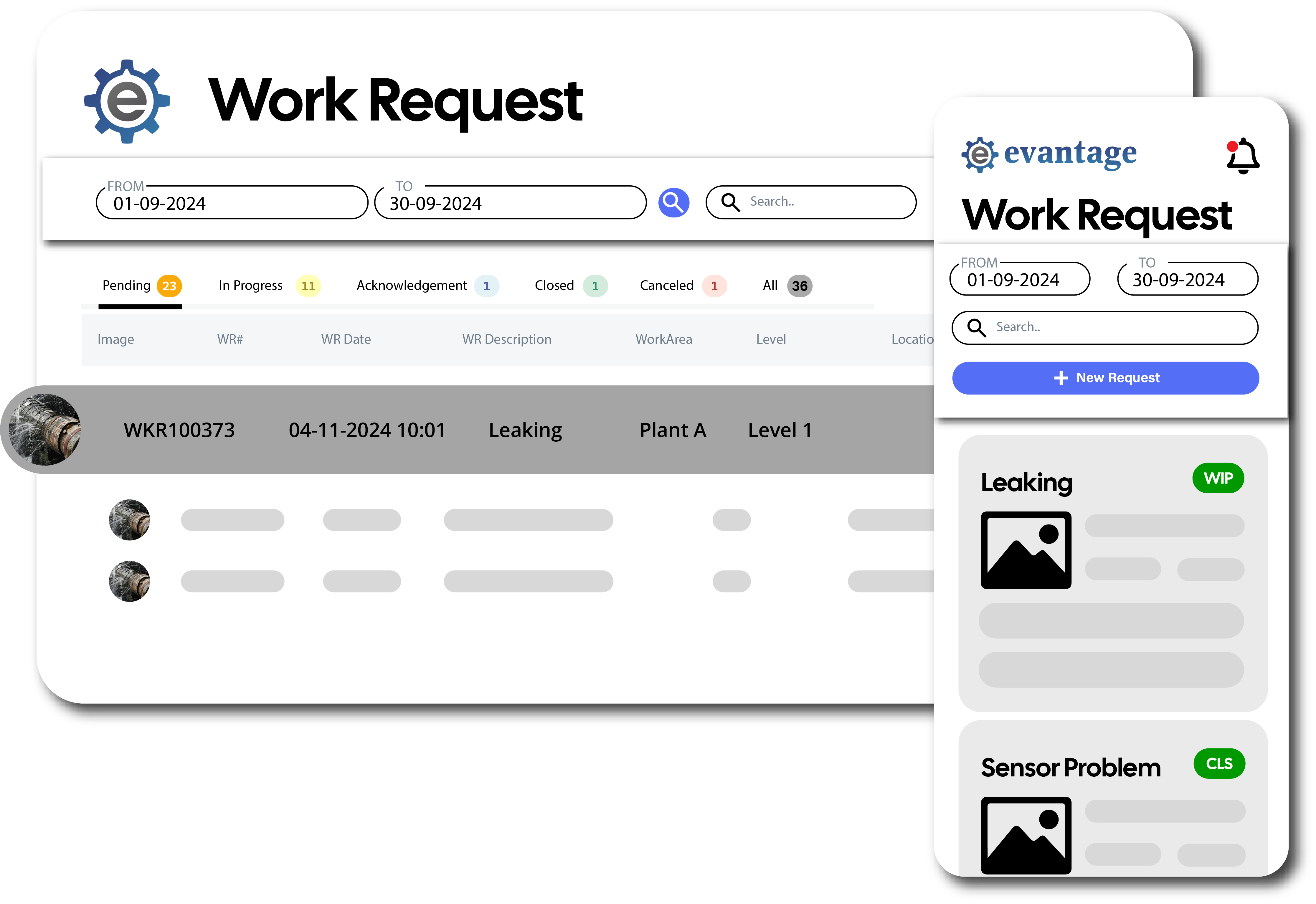
          <h1>Responsive Web Application</h1>
          <p>Evantage’s Responsive Web Application ensures that maintenance management can be accessed seamlessly from any device—whether it’s a desktop, tablet, or smartphone. This flexibility allows your team to stay connected and request new breakdown on the go, improving productivity and efficiency. The application automatically adjusts to different screen sizes, ensuring a smooth user experience across all devices. Whether in the office or out in the field, your team can access and request new breakdown and track job request status anytime, anywhere.</p>
      </div>
      <div class="industry-img" data-aos="fade-left">
          <img src="/views/assets/img/ProductPage/WRIntro.png" alt="Work Order Image">
      </div>
    </div>
    <div class="industry-cmms">
      <div class="industry-img" data-aos="fade-right">
          <img src="/views/assets/img/ProductPage/WRNew.png" alt="Asset Scan Image">
      </div>
      <div class="industry-text" data-aos="fade-left">
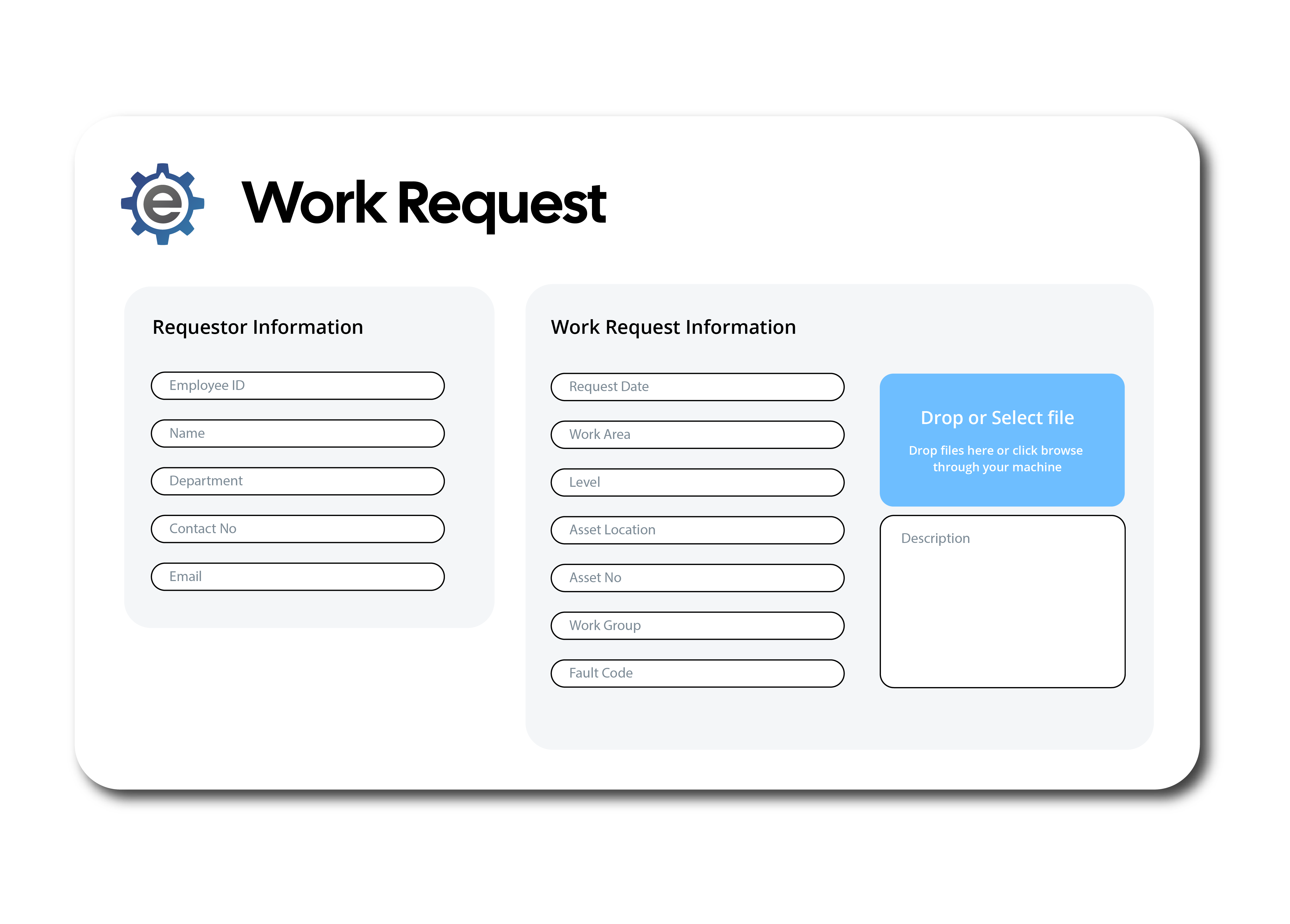
          <h1>Request Breakdown to Maintenance Team</h1>
          <p>With Breakdown Requests integrated into the Evantage platform, team members can instantly notify the maintenance department about equipment malfunctions or urgent repairs. Instead of relying on manual reporting or waiting for a response, users can quickly submit breakdown requests via the web application. The system ensures that no issue is overlooked, and the maintenance team is immediately alerted to address the problem. This streamlined process helps reduce response times and ensures that critical repairs are prioritized and handled swiftly.</p>
      </div>
    </div>
    <div class="industry-cmms">
      <div class="industry-text" data-aos="fade-right">
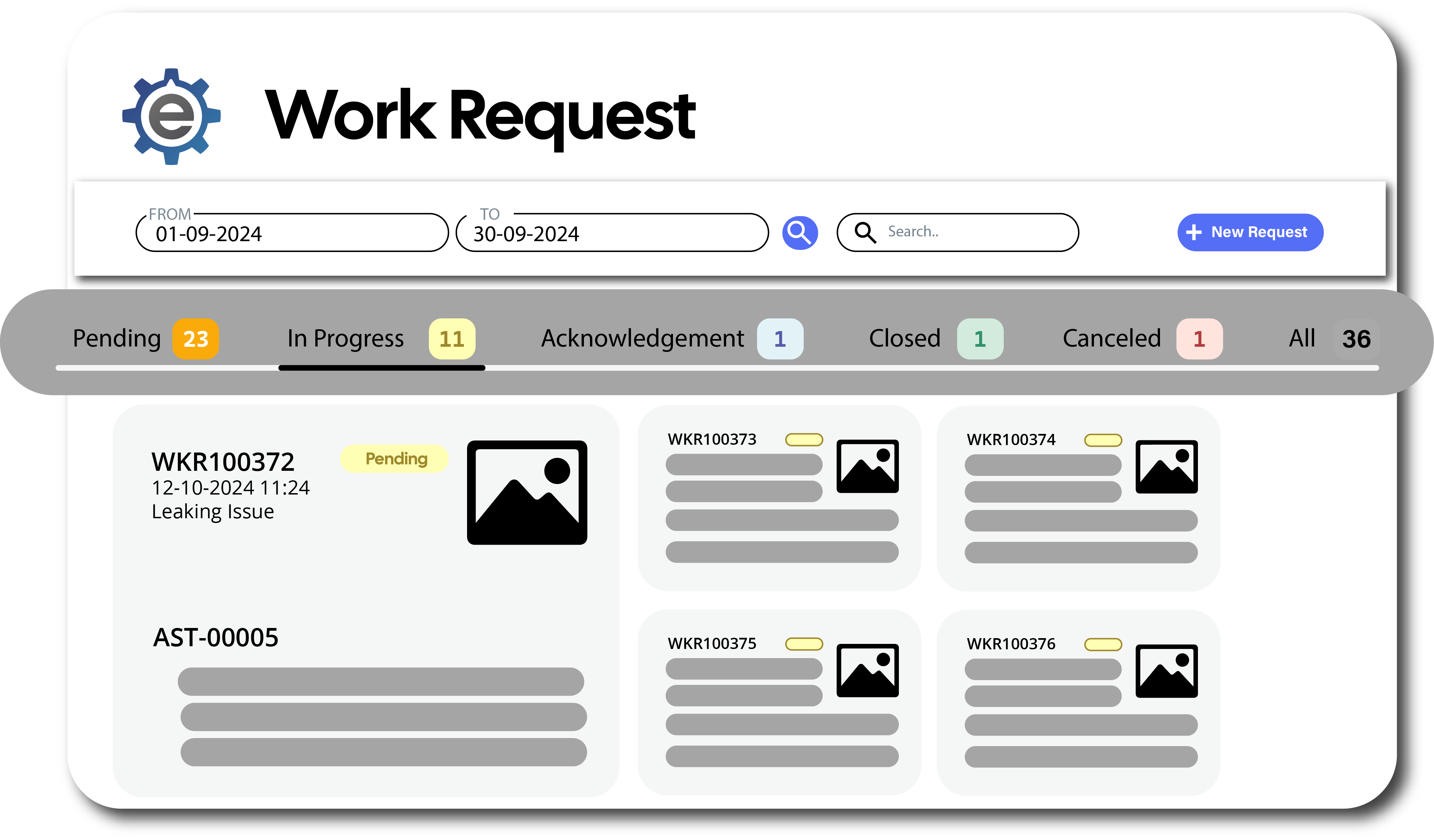
          <h1>Monitor Job Status</h1>
          <p>Evantage allows you to monitor the status of jobs in real-time and easily assign tasks to the right team members. The web application provides a centralized dashboard where managers can track the progress of all ongoing maintenance tasks. Whether a job is in progress, pending, or completed, you’ll have full visibility at every stage. Additionally, work orders can be efficiently assigned to technicians or maintenance teams based on availability, skill set, and priority. This ensures optimal resource allocation, timely completion of tasks, and better coordination across teams.</p>
      </div>
      <div class="industry-img" data-aos="fade-left">
          <img src="/views/assets/img/ProductPage/WRMonitoring.png" alt="CMMS Image">
      </div>
    </div>
  </div>
  </section>  
<!--End About Section-->

  <%- include('../partials/Footer'); %>
</body>

</html>